One Saturday morning, I caught myself staring at my UniFi dashboard. My home network was running, but not running well.
I had been telling my team for months that AI tools amplify builders. The bottleneck is never the stack itself, but the thinking, the context, and the willingness to engage with the messy details long enough to make better decisions.
So I decided to put my own thesis to the test. I opened Claude Code for my house instead of a coding project.
I was comfortable doing that because Claude Code ran locally, reasoning over files I controlled and helping me think through the system. Nothing touched my firewall, routing rules, VLANs, or access points unless I typed the change into UniFi myself, and that boundary mattered.
The point is simple: AI did not configure my network. It helped me understand it.
The setup I had
I run a Ubiquiti Dream Machine SE as the brain of my home network. It's the router, firewall, WiFi controller, and Protect NVR all in one. Three U6 Mesh access points cover the house, and two ISPs land on the box: Spectrum cable as the workhorse and Verizon 5G Home as the helper.
The setup included four VLANs, two SSIDs, a handful of routing rules, and a growing collection of devices. On paper, that's a respectable homelab. In practice, I had built it the way many engineers build personal infrastructure: I stood it up, made it work, and moved on.
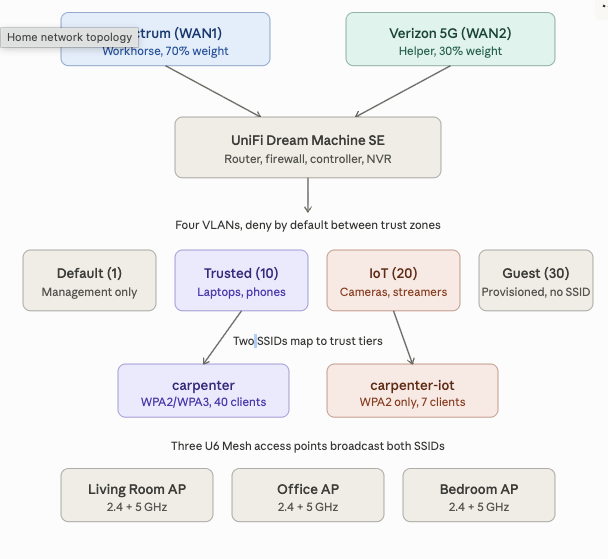
Load balancing ran with default weights and untuned health checks. VLANs existed, but the firewall rules between them were not enforcing the trust boundaries I thought they were. My IoT devices and my work laptop shared paths in ways I hadn't really thought through. My Zscaler VPN occasionally fell off a cliff, and I kept blaming Verizon without proving it.
Worst of all, I couldn't have explained to anyone, including myself, why every part of it was configured the way it was.
The honest moment
I am a VP of Engineering. I lead a large engineering organization, and I spend a lot of time talking about architecture, platforms, guardrails, documentation, and operational discipline.
I also still ship code, tinker with systems, and occasionally break things in my own house. Then I explain to my family why the internet is having a character-building moment.
That's what made the moment uncomfortable in the right way. I had a network setup that worked well enough most days, but I couldn't fully defend the design.
That gap between what I knew was possible and what I had actually built felt familiar. I see versions of it at work all the time when teams have strong tools and decent architecture, but no clear throughline connecting the decisions. The fix is rarely a new tool, and more often it's slowing down long enough to ask better questions.
So I asked Claude Code to help me ask better questions.
Claude Code outside the code editor
Most people use Claude Code for what it says on the tin: generating code, refactoring a module, running a build, or fixing a failing test. That is the obvious surface area, and it's genuinely useful. Claude Code is also a tool for structured reasoning over text, files, commands, and context.
That distinction matters because networking gear produces text. Configurations, logs, vendor documentation, and RFCs are all text, so if the problem can be expressed clearly, the tool can help reason about it.
I exported the relevant pieces of my UniFi configuration into a markdown file: gateway settings, access points, VLANs, SSIDs, DHCP scopes, firewall rules, routing rules, QoS rules, security posture, and known issues. I wrote it the way I would write a runbook for a new engineer joining my team. Instead of a raw configuration dump, it was a narrative that tried to explain intent, trade-offs, and the places where I knew the system had drifted. Then I handed Claude Code that file and asked it to be skeptical.
The conversation that mattered
The first round was diagnostic. I asked Claude Code to read the setup and tell me what looked wrong, what looked inconsistent, and what looked like it had been built by someone who got distracted halfway through. The answers were uncomfortable in the best possible way because they exposed the gap between the network I thought I had and the network I had actually configured.
My IDS/IPS scope did not match my mental model
I had IDS/IPS turned up aggressively, with the full signature set, notify-and-block mode, and maximum sensitivity. The problem was that the control was narrower than my mental model of it.
I had scoped inspection too tightly around the Default VLAN, which was mostly management gear. Trusted, IoT, and Guest traffic weren't getting the level of inspection I assumed they were. I had built a strong checkpoint on a road very few people used. That is exactly the kind of issue AI is useful for surfacing, because it can hold the intended model and the actual configuration side by side and ask whether they really match.
My load balancing was naive
I had a 50/50 split between Spectrum and Verizon, with both WANs relying on similar health-check targets. That looked balanced, but it wasn't thoughtful.
Spectrum is my reliable workhorse. Verizon 5G Home is useful as a second pipe, but it's not the connection I want carrying half my household by default. It also didn't help that both WANs could mark themselves unhealthy at the same time if the shared health-check path had a hiccup.
Claude Code helped me reason through a better model. We diversified the SLA targets, tuned the health checks, and shifted the weight to match reality. Spectrum carries most of the load, while Verizon helps when it should. The configuration now reflects the actual operating model instead of pretending both links are equivalent.
My Zscaler problem had a real cause
I had been blaming Verizon for my work VPN problems in the vague way we blame things we haven't fully diagnosed. The better explanation was more specific: Zscaler didn't love asymmetric paths, CGNAT, and multi-path flow splitting over a 5G link.
When traffic moved unpredictably between WANs, the VPN experience got ugly. The fix was precise. I created a policy-based route that pinned my work MacBook to Spectrum by MAC address, regardless of the load balancer's mood.
I tested the VPN throughput before and after, and the cliff vanished. One change produced one verifiable result, which reminded me that I had been living with a problem I could have solved earlier if I'd stopped to define it clearly.
Netflix was making the same complaint
Streaming had its own version of the problem. Netflix would re-authenticate or drop quality when a flow landed on Verizon, which made more sense once I thought about how streaming providers use public egress IPs, CDN behavior, and session consistency.
The fix was another policy-based route, this time matching a curated list of Netflix domains and sending that traffic out Spectrum. The domain list needs occasional refresh because Netflix shuffles its CDN egress patterns, but the routing rule itself is stable. Streaming has been boring ever since, which is exactly what you want from streaming.
My VLAN segmentation was performative
I had four VLANs, but the firewall rules weren't enforcing the trust boundaries I thought they were. In a stateful firewall, rule order matters because the first matching rule wins. A broad block rule above a narrow allow rule can silently kill the use case the allow rule was meant to support.
That mattered for the IoT-to-Trusted path. Google Cast and one Minecraft device needed narrow exceptions, so those allow rules needed to sit above the broader IoT-to-Trusted block rule. They now do, which means the block rule is finally acting like a boundary instead of a suggestion.
mDNS was the puzzle I did not know I had
Once you segment a network properly, your phone on the Trusted VLAN can no longer magically see the Chromecast on the IoT VLAN. That is the point of segmentation, not a bug.
The lazy fix is to punch broad firewall holes and call it a day. The gateway mDNS proxy does the job properly, scoped only to the VLANs that need to discover each other. I had no idea that feature existed before this exercise, and now I understand both the problem and the right way to solve it.
The before and after
The value of the session was a series of small corrections that made the system more understandable.
| Area | Before | After |
|---|---|---|
| WAN routing | 50/50 split across Spectrum and Verizon | Weighted routing that reflects Spectrum as the workhorse and Verizon as the helper |
| VPN stability | Work traffic could land on the 5G path | Work MacBook pinned to Spectrum |
| Streaming | Netflix could re-authenticate or drop quality | Netflix traffic routed consistently through Spectrum |
| IDS/IPS | Control scope was narrower than my mental model | Scope captured as a known gap with a clear next step |
| IoT segmentation | VLANs existed, but boundaries were loose | Narrow allow rules placed above broader deny rules |
| Device discovery | Broad access was tempting | Scoped mDNS between only the VLANs that needed discovery |
| Documentation | Most intent lived in my head | NETWORK.md became the source of truth |
That table captures the difference between a system that works and a system I can explain.
What this looked like in practice
Claude Code never typed into my UniFi dashboard, and it didn't need that level of access to be useful. This was a working session where I described what I had, Claude Code asked clarifying questions, suggested changes with reasoning, and I made the changes by hand in the UniFi UI.
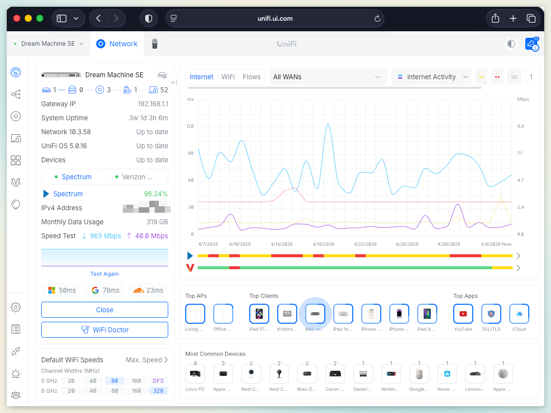
That separation of concerns is important. Claude Code could reason, challenge, summarize, and suggest, but I still made every change manually. Anything that touches routing, firewall rules, segmentation, or security boundaries deserves that level of friction. Agents advise; humans decide.
What the agent did, and what would have taken me much longer alone, was hold the whole picture in its head while I poked at one corner at a time. When I changed the WAN weighting, it reminded me to verify that NAT and failover behavior still made sense. When I added the Netflix routing rule, it asked whether I should sanity-check the QoS rule for FaceTime so I wasn't stacking conflicting policies on the same path.
That is the kind of assistance I value. It's better pressure against my own assumptions.
The document became the deliverable
I left the session with a NETWORK.md file I would trust because it captured the reasoning behind the configuration. I wrote the bones. Claude Code pressed on the gaps, challenged the weak spots, and pushed me to capture the rough edges I'd normally leave implicit.
Every VLAN now has a documented purpose. Every firewall rule has a documented intent. Every known issue is called out by name, including the Living Room access point negotiating at 100 Mbps because of what's almost certainly a flaky cable run, the Guest VLAN that exists but does not have a live SSID yet, and the IoT migration from carpenter to carpenter-iot that is roughly a third complete based on live client counts.
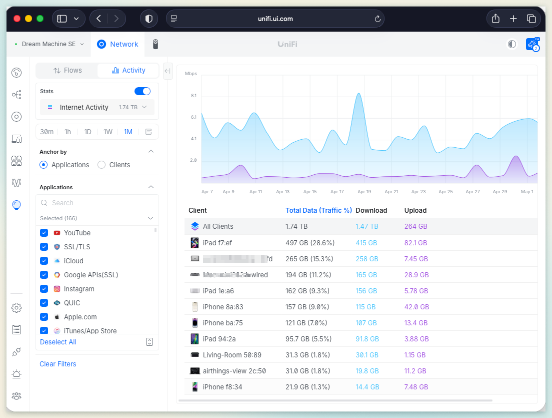
That document is now the source of truth I will hand to future me when I forget why I made these decisions 18 months from now. This is the same idea I have been pushing at work for the last year: the Context Spine. It's a lightweight, versioned artifact that travels with the system and explains intent, and it turns out the pattern works for a home network too.
What I learned
A few lessons stuck with me after the configuration changes were done and the house internet was still, thankfully, working.
The tool is not the point
Claude Code is excellent, and so are Claude chat, the API, and a growing list of other AI surfaces. Picking the right one matters, but it matters less than being clear about what you're trying to accomplish.
I used Claude Code here because I wanted shell access, file editing, and the ability to iterate on a markdown document over a longer working session. Different tasks deserve different tools, so the lesson was to bring the right context to the right tool, then stay engaged.
Domain expertise compounds
I am not a network engineer. I am a software person who has run enough infrastructure to be useful and occasionally dangerous, which is a very specific and familiar kind of confidence.
Claude Code is not a network engineer either, but when we combined vendor documentation, RFCs, live configuration, and a willingness to verify everything, we made better decisions than I would have made alone on a Saturday morning. That distinction matters because the agent amplified my curiosity instead of replacing expertise.
Documentation is the durable artifact
The improved configuration, the better firewall posture, and the cleaner routing model all matter. The most durable artifact is still the markdown file that explains why the system works the way it does. If the only thing AI tools did was lower the activation energy for writing things down, they'd already be valuable. Most systems fail because nobody remembers the reason, not because nobody can find the setting.
Be skeptical, including of the agent
Claude Code suggested a few things I rejected. One recommendation around region blocking would have cut off a country my brother travels to for work, while another proposed rule change would have broken Google Cast for the Apple TV in the living room, which my daughter would have noticed within an hour. The agent was confidently wrong in both cases, and catching that is the job.
Good collaboration looks the same whether your collaborator is human or AI. They bring breadth, you bring judgment, and both sides verify.
The pattern I would reuse
The pattern is simple enough to reuse well beyond home networks.
- Export or write down the current state.
- Describe the intent, not just the configuration.
- Ask the agent to challenge assumptions.
- Verify recommendations against documentation and real behavior.
- Make changes manually when security or reliability is involved.
- Capture the final state as durable documentation.
That pattern works for a UniFi network. It also works for a CI/CD platform, a Kubernetes operating model, a cloud account structure, a service onboarding flow, or any system where configuration and intent have drifted apart. The point is to make the system legible enough that a human can steer it better.
What is next
The known rough edges in NETWORK.md are now a small backlog. I need to widen IDS/IPS scope to cover the networks that matter, stand up the Guest SSID with a proper egress-only firewall rule, finish migrating IoT devices off carpenter and onto carpenter-iot, and replace the cable that's making the Living Room access point negotiate at 100 Mbps when the rest of the network is gigabit. None of this work is glamorous, but all of it is the kind of work that gets deferred when you don't have a clear picture of the system.
I have a clear picture now, and the backlog is finite. That, more than any single configuration change, is the win.
Why I think this matters
I write a lot about AI in the enterprise, including pipeline-first delivery, the agentic SDLC, the Context Spine, the apprenticeship argument, and the need for teams to treat AI as part of the delivery system rather than as a novelty sitting off to the side. The risk in writing about all of that from a corporate perch is that it can start to sound abstract. Strategy decks, steering committees, and slides can read well without ever touching a real system.
Spending a Saturday using the same tools I'm asking my organization to understand, on a problem that mattered to my actual life, is the cheapest way I know to keep that thinking honest. If Claude Code can help a VP of Engineering build a better home network on a weekend, it can help an engineer at any level go faster on Monday, given the right context, the right guardrails, and the right level of human judgment. My network is faster, safer, and finally documented. More importantly, I understand it again.