From Copy-Paste to Skill: What Thousands of AI Coding Sessions Taught Me About Guardrails
After thousands of sessions with Claude Code, Codex, Kiro, and every other LLM-based CLI and IDE, I distilled what I learned into a reusable Claude Skill. Here's how those lessons became the guardrails that let me move faster and actually trust the output.
From Copy-Paste to Skill: What Thousands of AI Coding Sessions Taught Me About Guardrails
About a year ago, I had a text file.
It wasn't much. Maybe forty lines of notes I'd paste into Claude Code at the start of every session. Things like "don't forget to run the tests," "use conventional commits," and "please don't rewrite my entire codebase when I ask you to fix a typo." The kind of guardrails you learn after your AI assistant confidently ships code that breaks in ways you didn't anticipate.
That text file became a markdown doc. The markdown doc became a system. And now, after thousands of sessions across Claude Code, Codex, Kiro, and every other LLM-based CLI and IDE I could get my hands on, it's a full Claude Code Skill (version 10.0) that I'm sharing publicly so you can use it, fork it, and make it your own.
This isn't a product review. It's the distillation of what I've actually learned, across tools, across stacks, across hundreds of corrections, about how to guide these systems toward output you can trust. Because the lesson wasn't specific to any one tool. It was the same everywhere: the models are capable, but capability without guardrails produces fast, confident, wrong code. The guardrails are what make the speed usable.
This is the story of how I built them.
The Problem: AI Is Fast, But Fast in the Wrong Direction Is Expensive
I've been writing software for over 30 years. I've seen a lot of paradigm shifts: from Java and J2EE to microservices, from data centers to Kubernetes, from waterfalls to whatever we're calling our process this quarter. But nothing has changed the velocity of my daily work like AI-assisted coding.
Claude Code, Codex, Kiro, the GitHub Copilot integrations, the IDE plugins: I've used them all extensively. Each one has its strengths. Each one has the same failure mode. They're fast. Impressively, dangerously fast. And without direction, that speed works against you.
Early on, I'd kick off a session, ask one of these tools to build something, and get back code that worked. Technically. But it wouldn't match the patterns in my codebase. It wouldn't have tests. It would reach for a library I'd never heard of when the standard library had a perfectly good solution. It would "finish" without committing, and when the context window ran out, all that work evaporated.
The problem wasn't the models. The problem was me. I hadn't told them how we do things.
I needed a way to say: here's how we do things. Every time. No exceptions. And I needed that to work regardless of which tool I was in.
Version 1: The Pasted Prompt
The first version was embarrassingly simple. I kept a coding-standards.md file on my desktop and pasted the relevant sections into Claude at the start of each session. It had maybe six rules:
- Read the codebase before writing code.
- Write tests.
- Use conventional commits.
- Don't modify files outside the task scope.
- Commit frequently.
- Run the test suite after every change.
Even this was a game-changer. The code Claude produced immediately got better, not because the rules were sophisticated, but because any constraints beat no constraints when you're working with an LLM.
Version 2: Learning from Mistakes
Every time Claude did something I didn't like, I'd add a rule. Every correction became a line item.
Claude used a TypeScript enum? "Prefer literal unions over enums." Claude wrote a 200-line function? "Functions should be 30 lines or fewer." Claude swallowed an exception silently? "Never swallow exceptions. Use typed errors."
My wife asked me one night why I was furiously typing at 11pm, and I told her I was writing rules for an AI that keeps making the same mistakes. She gave me the look. You know the one.
But this was actually the breakthrough insight: corrections are the highest-signal input for building good standards. Every mistake Claude made and I caught was a rule waiting to be written. The document grew from 40 lines to 200, then 400.
I started organizing it into sections: agentic behavior, code quality, testing, security, git workflow. I added a "Definition of Done" checklist so Claude would stop telling me things were "done" when they clearly weren't. I added a "Red Flags" section to pattern-match on the kinds of mistakes that kept recurring.
Version 3: Crowdsourcing from the Community
This is where it gets interesting.
Sometime around early 2026, Boris Cherny (the creator of Claude Code) started publishing his workflow tips on Twitter. I devoured every thread. The tips were practical, opinionated, and came from someone who had built the tool and used it daily.
I started cross-referencing Boris's tips with my own standards. Some things I already had: spec-driven development, subagent delegation, the re-planning trigger. But Boris surfaced patterns I'd never considered.
He framed verification differently from anything I'd done before. Give Claude a domain-specific feedback loop before you start coding, not just a checklist at the end, and the output quality doubles or triples. Build verification into the workflow from the beginning, not as an afterthought.
He also showed me that PostToolUse hooks could auto-format on every write, and PostCompact hooks could re-inject critical context when Claude compressed the conversation. I was relying on discipline to enforce formatting. Boris showed me you can automate it.
The CLAUDE.md pattern was the one I most wished I'd thought of: update it directly after every correction and let Claude write its own rules. Especially the @.claude pattern in PR reviews, where tagging Claude in a review comment automatically turns feedback into a permanent rule.
And where I was using subagents ad-hoc, Boris's team had them defined as .md files in .claude/agents/, each with a name, model, and focused prompt. Reusable, version-controlled, shared with the team.
I merged the best of these patterns into my standards, removed the redundancies, and tightened everything up. The community had effectively crowdsourced the hard-won lessons of hundreds of engineers into a single document.
Version 10: From Document to Skill
By this point, the document was proven across dozens of projects and multiple teams. But I was still manually making sure Claude had access to it. Sometimes I'd forget to reference it. Sometimes a new team member would start a session without it. The standards were good, but the distribution was manual.
Then I realized: this should be a Claude Code Skill.
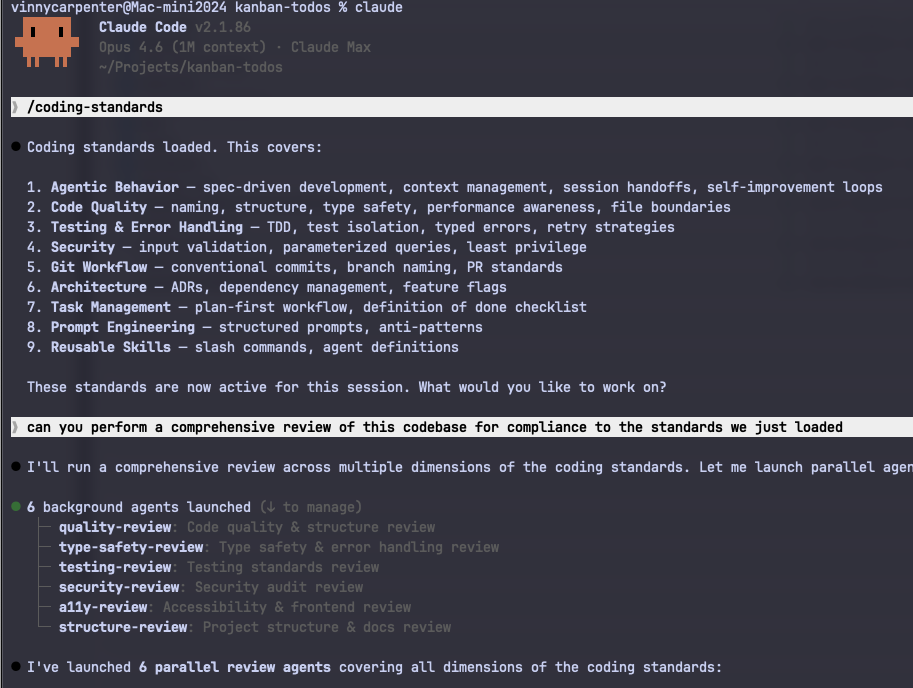
A Skill is a markdown file with YAML frontmatter that Claude Code loads automatically when the task matches the skill's description. Once installed, you don't invoke it. It's just there, governing every coding session. The standards aren't a reference doc anymore. They're active instructions that Claude follows without being prompted.
So I turned version 10.0 of my coding standards into a Skill. The package is simple:
.claude/
  skills/
    coding-standards/
      SKILL.md           # auto-loaded for all coding tasks
  commands/
    qspec.md             # /qspec: generate a feature spec on demand
    qcheck.md            # /qcheck: run a skeptical staff engineer review
The SKILL.md contains everything. The two slash commands are the only pieces that need explicit invocation. /qspec forces Claude into spec-writing mode for a feature. /qcheck runs a skeptical staff engineer review against the full coding standards. Everything else is automatic.
What's Actually in It
Rather than walk you through every section like a README, here are the parts that changed how I work.
The skill starts with agentic behavior: how Claude should orient on a codebase before touching anything, when to write a spec versus just implement, how to handle ambiguity, and when to stop and re-plan. It defines a two-layer memory system. Project-specific learnings live in tasks/lessons.md. Persistent rules live in CLAUDE.md. Every correction writes to one of these. Nothing gets lost.
Verification-first development gets its own section because it's the highest-leverage practice in the document. Define how you'll prove correctness before writing code. The skill gives domain-specific strategies for backend, API, frontend, data, and infrastructure work. This single habit cuts rework more than any other rule here.
Code quality standards cover the expected ground: naming, types, structure, performance, dependencies, feature flags, logging. Nothing exotic. The goal is consistency, not cleverness.
The hooks section is where the skill earns its keep. PostToolUse auto-formats on every write. PostCompact re-injects critical context after conversation compaction. Stop hooks act as verification gates before Claude declares something done. If a standard can be enforced by a hook, it should be. Willpower is a terrible enforcement mechanism.
Subagents get first-class treatment, with guidance on when to delegate, how to structure agent definitions, and which model to reach for. Haiku for read-only analysis. Sonnet or Opus for architecture and complex reasoning.
Finally, the Definition of Done is a single unified checklist: Correctness and Quality, Self-Review, and Documentation and Process. One checklist, not three scattered across the document. If it's not on the list, it's not blocking. If it is, it's not optional.
How to Use It
For a team: copy the .claude/ directory into your repo root and commit. Everyone who uses Claude Code gets the skill and slash commands automatically. No setup required.
For yourself: copy to ~/.claude/skills/ and ~/.claude/commands/ for global coverage across all projects.
And please customize it. The standards are opinionated because they reflect how I work. Fork it, edit it, make it yours. Add your project's formatter to the PostToolUse hook. Add your team's patterns to CLAUDE.md. The whole point is that it evolves with your corrections.
The GitHub Repo
I've published the full skill, slash commands, and README on GitHub:
github.com/vscarpenter/coding-standards-skill
Clone it, copy the .claude/ directory into your project, and you're running. PRs welcome. This thing got better every time someone contributed a pattern, and I'd love to keep that going.
Structure Beats Speed
Vibe coding is fun. Spec-driven, verification-first, standards-enforced coding is what ships. The skill adds maybe 30 seconds of overhead per session and saves hours of rework. That trade is obvious in retrospect. It wasn't when I started.
Corrections Are Gold
Every time Claude does something wrong and you catch it, that's a rule waiting to be written. Don't just fix it. Capture it. The best standards documents are written in frustration and refined into clarity. This document is basically a year of frustrations, distilled.
Automate the Boring Enforcement
If you're relying on Claude to remember to format code or run tests, you're relying on hope. Hooks exist. Use them. Standards enforced by automation beat standards enforced by willpower, every time.
Share Your Standards
The single biggest quality multiplier on my team wasn't a new tool or a new process. It was checking our .claude/ directory into git so every engineer got the same guardrails. Individual excellence is great. Consistent team output is better.
And honestly? The fact that I'm writing rules for an AI that writes code for me, and those rules improve because the AI helps me refine them. That recursive loop still blows my mind a little. We're living in the future. Might as well bring some standards with us.
Share this post
Related Posts
Building StillView 3.0: Raising the Quality Bar with Claude Code and Opus 4.5
Using Claude Code and Opus 4.5 as thinking partners helped me rebuild confidence, clarity, and quality in a growing macOS codebase.
They're Using Claude to Ship Claude (And It Shows)
Anthropic has shipped more meaningful product features in the last few weeks than most teams ship in a quarter. Projects, Dispatch, Channels, recurring tasks, new models: the pace is remarkable. My theory? They're dogfooding their own product to build the product. It's a little meta. It's a lot impressive.
From iOS to Android in a Weekend: How I Used Claude Code to Build a Complete App Without Writing a Single Line of Code
I took a production iOS app, pointed Claude Code at it, and had a fully functional Android app in eight hours over a weekend. Here's exactly how it worked.